In the digital age, privacy and security are paramount concerns for internet users. One of the lesser-known but crucial components of online privacy is What Is Private DNS. Understanding what private DNS is and how it works can significantly enhance your online security and privacy. This blog post will delve into the intricacies of private DNS, its benefits, and how to set it up on various devices.
What Is Private DNS?
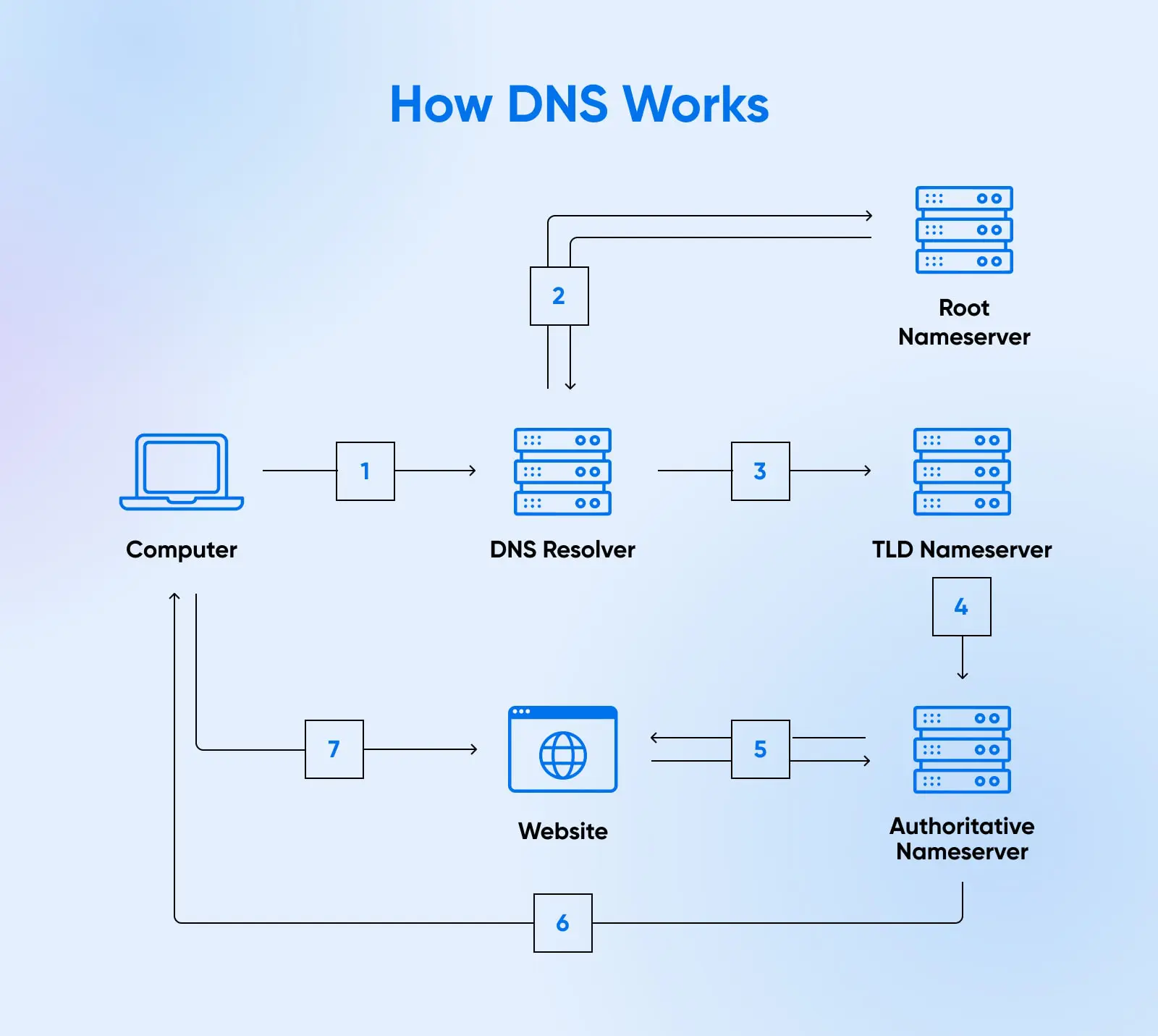
Private DNS, also known as encrypted DNS, is a system that encrypts DNS queries to prevent eavesdropping and manipulation. DNS, or Domain Name System, translates human-readable domain names (like www.example.com) into IP addresses that computers use to identify each other on the network. Traditionally, DNS queries are sent in plaintext, making them vulnerable to interception and manipulation by malicious actors.
Private DNS encrypts these queries, ensuring that your browsing activity remains private and secure. This encryption prevents ISPs, hackers, and other third parties from monitoring your online activities. By using private DNS, you can protect your privacy and enhance your security while browsing the internet.
Benefits of Using Private DNS
There are several benefits to using private DNS, including:
- Enhanced Privacy: Private DNS encrypts your DNS queries, making it difficult for anyone to track your online activities.
- Improved Security: Encrypted DNS queries protect against DNS spoofing and man-in-the-middle attacks, ensuring that you connect to the correct websites.
- Bypass Censorship: In some regions, private DNS can help bypass internet censorship by allowing you to access blocked websites.
- Faster Browsing: Some private DNS services offer faster DNS resolution times, leading to quicker page loads and a smoother browsing experience.
How Private DNS Works
Private DNS works by encrypting DNS queries using protocols like DNS over HTTPS (DoH) or DNS over TLS (DoT). These protocols ensure that the data exchanged between your device and the DNS server is encrypted, preventing unauthorized access.
Here's a simplified breakdown of how private DNS works:
- Your device sends a DNS query to a private DNS server using an encrypted protocol.
- The private DNS server receives the encrypted query, decrypts it, and resolves the domain name to an IP address.
- The private DNS server sends the IP address back to your device in an encrypted response.
- Your device decrypts the response and uses the IP address to connect to the desired website.
Setting Up Private DNS on Different Devices
Setting up private DNS is relatively straightforward on most devices. Below are the steps for setting up private DNS on Android, iOS, Windows, and macOS.
Android
To set up private DNS on an Android device:
- Go to Settings > Network & internet > Advanced > Private DNS.
- Select Private DNS provider hostname.
- Enter the hostname of the private DNS provider you want to use (e.g., dns.google for Google’s private DNS).
- Save the settings and restart your device.
💡 Note: Not all Android devices support private DNS. Ensure your device is running Android 9 (Pie) or later.
iOS
To set up private DNS on an iOS device:
- Go to Settings > Wi-Fi.
- Tap the i icon next to the network you are connected to.
- Scroll down and tap Configure DNS.
- Select Manual.
- Add the IP addresses of the private DNS servers you want to use.
- Save the settings and restart your device.
💡 Note: iOS devices do not natively support private DNS over HTTPS (DoH). You may need to use a third-party app or VPN for full private DNS functionality.
Windows
To set up private DNS on a Windows device:
- Open Settings > Network & Internet > Change adapter options.
- Right-click on your network connection and select Properties.
- Select Internet Protocol Version 4 (TCP/IPv4) and click Properties.
- Click Advanced > DNS.
- Select Append these DNS suffixes (in order) and enter the hostname of the private DNS provider.
- Save the settings and restart your device.
💡 Note: Windows 10 and later versions support private DNS over HTTPS (DoH) through the Settings app. Go to Settings > Network & Internet > Wi-Fi > Change adapter options > Properties > Internet Protocol Version 4 (TCP/IPv4) > Properties > Advanced > DNS and enter the hostname of the private DNS provider.
macOS
To set up private DNS on a macOS device:
- Go to System Preferences > Network.
- Select your network connection and click Advanced.
- Go to the DNS tab.
- Click the + button to add a new DNS server.
- Enter the IP address of the private DNS server you want to use.
- Save the settings and restart your device.
💡 Note: macOS supports private DNS over HTTPS (DoH) through the System Preferences app. Go to System Preferences > Network > Advanced > DNS and enter the hostname of the private DNS provider.
Popular Private DNS Providers
There are several popular private DNS providers that offer reliable and secure services. Some of the most well-known providers include:
| Provider | Protocol | Features |
|---|---|---|
| DoH, DoT | Fast resolution times, global network, easy to set up | |
| Cloudflare | DoH, DoT | Enhanced privacy, malware blocking, global network |
| Quad9 | DoT | Security-focused, blocks malicious domains, global network |
| OpenDNS | DoT | Parental controls, malware blocking, customizable filtering |
Common Misconceptions About Private DNS
There are several misconceptions about private DNS that can lead to confusion. Here are some of the most common myths debunked:
- Private DNS is only for tech-savvy users: While setting up private DNS may seem technical, it is relatively straightforward and can be done by anyone with basic computer skills.
- Private DNS slows down internet speed: In reality, private DNS can often improve internet speed by providing faster DNS resolution times.
- Private DNS is only for mobile devices: Private DNS can be set up on a variety of devices, including desktops, laptops, and routers.
- Private DNS is not necessary if you use a VPN: While VPNs provide encryption for your internet traffic, they do not encrypt DNS queries. Using private DNS in conjunction with a VPN can provide an additional layer of security.
Future of Private DNS
As privacy and security concerns continue to grow, the importance of private DNS is likely to increase. More devices and operating systems are expected to support private DNS in the future, making it easier for users to protect their online activities. Additionally, advancements in encryption technologies will further enhance the security and privacy benefits of private DNS.
Private DNS is also expected to play a crucial role in the development of the Internet of Things (IoT). As more devices become connected to the internet, the need for secure and private DNS resolution will become even more critical. Private DNS can help protect IoT devices from malicious attacks and ensure that they communicate securely with each other.
In conclusion, private DNS is a vital tool for enhancing online privacy and security. By encrypting DNS queries, private DNS prevents eavesdropping and manipulation, ensuring that your browsing activity remains private and secure. Setting up private DNS on your devices is a straightforward process that can significantly improve your online experience. As the importance of privacy and security continues to grow, private DNS will play an increasingly crucial role in protecting our digital lives.
Related Terms:
- is private dns safe
- what does private dns do
- how to configure private dns
- what does private dns mean
- public dns versus private split
- how does private dns work