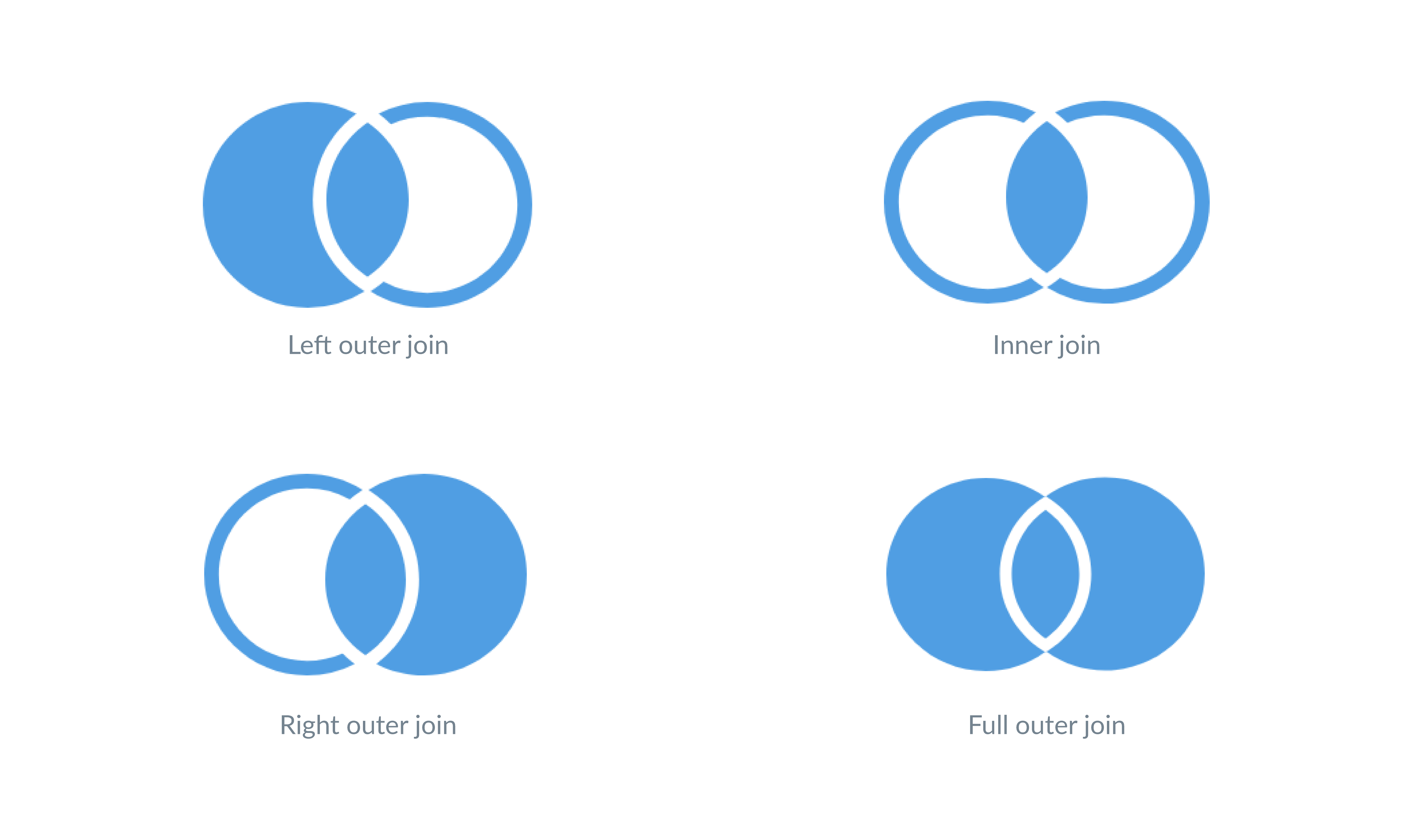
In the realm of database management, understanding the intricacies of different types of joins is crucial for effective data retrieval and manipulation. One such join that often comes up in discussions is the Right Outer Join. This type of join is particularly useful when you need to include all records from the right table and the matched records from the left table. In this post, we will delve into the details of the Right Outer Join, its applications, and how it differs from other types of joins.
Understanding Joins in SQL
Before diving into the specifics of the Right Outer Join, it’s essential to have a basic understanding of SQL joins. Joins are used to combine rows from two or more tables based on a related column between them. The most common types of joins include:
- INNER JOIN
- LEFT JOIN (or LEFT OUTER JOIN)
- RIGHT JOIN (or RIGHT OUTER JOIN)
- FULL JOIN (or FULL OUTER JOIN)
Each type of join serves a different purpose and is used in different scenarios depending on the data requirements.
What is a Right Outer Join?
A Right Outer Join returns all records from the right table and the matched records from the left table. If there is no match, the result is NULL on the side of the left table. This type of join is particularly useful when you want to ensure that all records from the right table are included in the result set, regardless of whether there are matching records in the left table.
Syntax of Right Outer Join
The syntax for a Right Outer Join in SQL is straightforward. Here is the basic structure:
SELECT columns
FROM table1
RIGHT OUTER JOIN table2
ON table1.common_field = table2.common_field;
In this syntax:
- columns: Specifies the columns you want to retrieve from the tables.
- table1: The left table in the join.
- table2: The right table in the join.
- common_field: The column that is used to match records between the two tables.
Examples of Right Outer Join
To better understand how a Right Outer Join works, let’s consider a couple of examples.
Example 1: Basic Right Outer Join
Suppose we have two tables, Employees and Departments. The Employees table contains information about employees, and the Departments table contains information about departments. We want to retrieve all departments along with the employees who belong to them.
Here are the tables:
| Employees | Departments | ||||||||||||||||||||||
|---|---|---|---|---|---|---|---|---|---|---|---|---|---|---|---|---|---|---|---|---|---|---|---|
|
|
The SQL query for a Right Outer Join would look like this:
SELECT Employees.EmployeeName, Departments.DepartmentName
FROM Employees
RIGHT OUTER JOIN Departments
ON Employees.DepartmentID = Departments.DepartmentID;
The result of this query would include all departments, even those without any employees, and the corresponding employee names where available.
Example 2: Right Outer Join with Multiple Tables
In more complex scenarios, you might need to join multiple tables. Let’s extend the previous example by adding a third table, Projects, which contains information about projects and the departments they belong to.
Here is the structure of the Projects table:
| Projects | ||||||||||||
|---|---|---|---|---|---|---|---|---|---|---|---|---|
|
The SQL query for a Right Outer Join involving multiple tables would look like this:
SELECT Employees.EmployeeName, Departments.DepartmentName, Projects.ProjectName
FROM Employees
RIGHT OUTER JOIN Departments
ON Employees.DepartmentID = Departments.DepartmentID
RIGHT OUTER JOIN Projects
ON Departments.DepartmentID = Projects.DepartmentID;
This query will return all projects along with the corresponding departments and employees, ensuring that all records from the Projects table are included.
Right Outer Join vs. Other Joins
To fully appreciate the Right Outer Join, it’s helpful to compare it with other types of joins.
Right Outer Join vs. Left Outer Join
A Left Outer Join returns all records from the left table and the matched records from the right table. If there is no match, the result is NULL on the side of the right table. In contrast, a Right Outer Join returns all records from the right table and the matched records from the left table. If there is no match, the result is NULL on the side of the left table.
Right Outer Join vs. Inner Join
An Inner Join returns only the records that have matching values in both tables. It does not include records that do not have a match in the other table. A Right Outer Join, on the other hand, includes all records from the right table and the matched records from the left table, ensuring that no records from the right table are omitted.
Right Outer Join vs. Full Outer Join
A Full Outer Join returns all records when there is a match in either left or right table. If there is no match, the result is NULL on the side that does not have a match. A Right Outer Join is more specific, as it only includes all records from the right table and the matched records from the left table.
💡 Note: The choice between these joins depends on the specific requirements of your query and the data you need to retrieve.
Use Cases for Right Outer Join
The Right Outer Join is particularly useful in scenarios where you need to ensure that all records from the right table are included in the result set. Some common use cases include:
- Reporting: When generating reports that need to include all departments, even those without any employees.
- Data Integration: When integrating data from multiple sources and ensuring that all records from one source are included.
- Audit Trails: When creating audit trails that need to include all transactions, even those without corresponding entries in another table.
Performance Considerations
While the Right Outer Join is a powerful tool, it’s important to consider performance implications. Joins can be resource-intensive, especially when dealing with large datasets. Here are some tips to optimize performance:
- Indexing: Ensure that the columns used in the join condition are indexed. This can significantly speed up the join operation.
- Selective Columns: Only select the columns that are necessary for your query. Avoid selecting all columns (*) unless absolutely necessary.
- Filtering: Apply filters to reduce the number of rows before performing the join. This can help minimize the amount of data that needs to be processed.
💡 Note: Always test your queries with a smaller dataset before running them on a production database to ensure optimal performance.
In conclusion, the Right Outer Join is a valuable tool in the SQL toolkit, offering a way to include all records from the right table and the matched records from the left table. Understanding when and how to use it can greatly enhance your ability to retrieve and manipulate data effectively. By comparing it with other types of joins and considering performance implications, you can make informed decisions about when to use a Right Outer Join in your SQL queries.
Related Terms:
- right outer join query
- inner join
- right outer join sql
- left right outer join
- left inner join
- right outer join oracle