Understanding the relationship between variables is a fundamental aspect of data analysis. In the realm of statistics and data science, R Programming Correlation plays a crucial role in identifying and quantifying these relationships. Correlation analysis helps researchers and analysts determine how strongly two variables are related and whether this relationship is positive, negative, or neutral. This post will delve into the intricacies of R Programming Correlation, exploring its types, methods, and practical applications.
Understanding Correlation
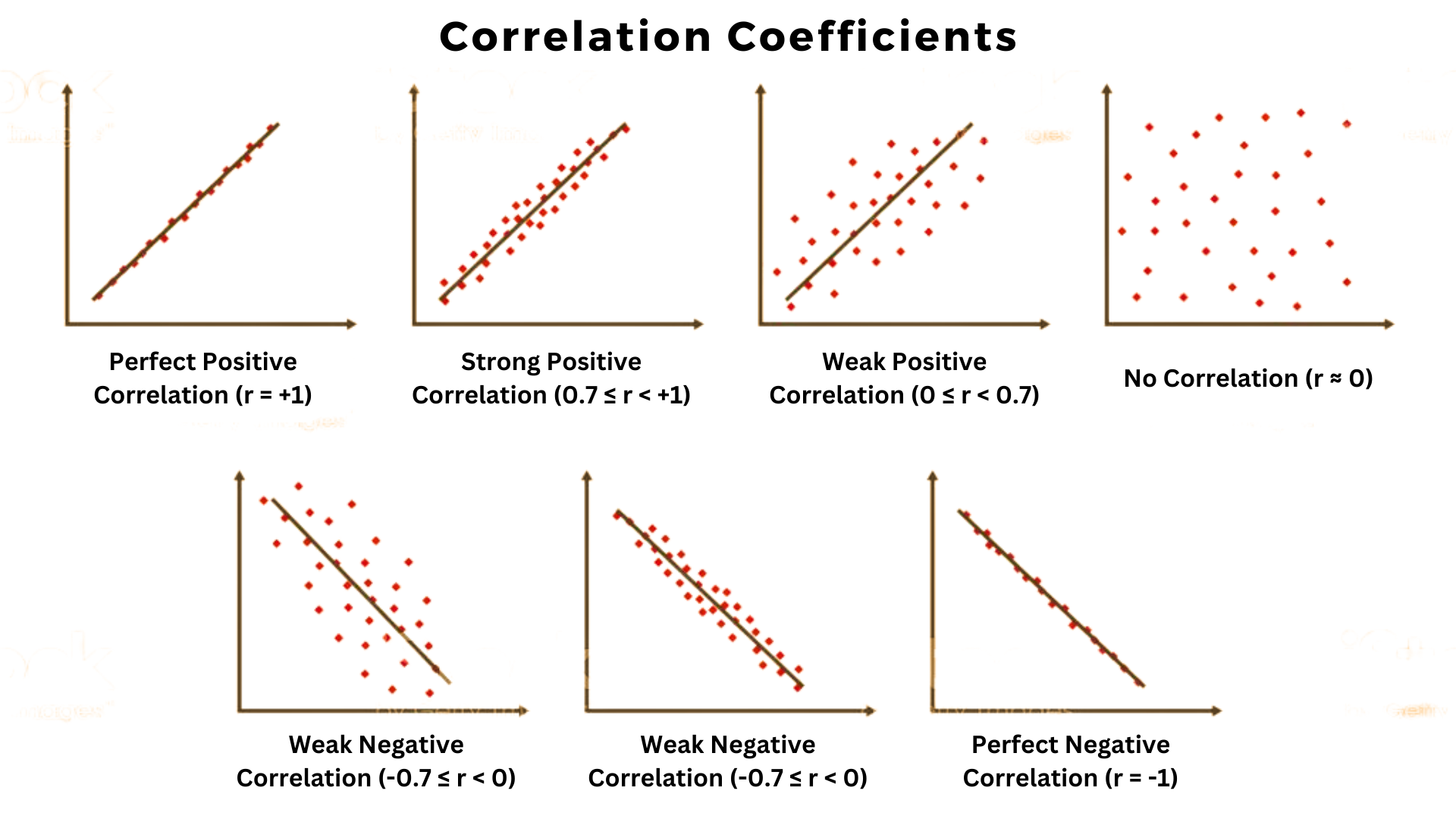
Correlation is a statistical measure that expresses the extent to which two variables are linearly related. The most common type of correlation is the Pearson correlation coefficient, which measures the linear relationship between two continuous variables. The value of the Pearson correlation coefficient ranges from -1 to 1, where:
- -1 indicates a perfect negative linear relationship.
- 0 indicates no linear relationship.
- 1 indicates a perfect positive linear relationship.
Other types of correlation include Spearman’s rank correlation, which measures the monotonic relationship between two variables, and Kendall’s tau, which assesses the ordinal association between two variables.
Types of Correlation
There are several types of correlation coefficients, each suited to different types of data and relationships. Understanding these types is essential for accurate R Programming Correlation analysis.
Pearson Correlation
The Pearson correlation coefficient is the most widely used measure of linear correlation. It is calculated using the formula:
r = Σ[(x_i - x̄)(y_i - ȳ)] / √[Σ(x_i - x̄)² * Σ(y_i - ȳ)²]
Where:
- x_i and y_i are the individual sample points.
- x̄ and ȳ are the means of the samples.
Pearson correlation is sensitive to outliers and assumes that the data is normally distributed.
Spearman’s Rank Correlation
Spearman’s rank correlation coefficient measures the strength and direction of association between two ranked variables. It is calculated using the formula:
ρ = 1 - [6 * Σd_i²] / [n(n² - 1)]
Where:
- d_i is the difference between the ranks of corresponding values.
- n is the number of observations.
Spearman’s rank correlation is useful when the data is not normally distributed or when dealing with ordinal data.
Kendall’s Tau
Kendall’s tau is another non-parametric measure of correlation that assesses the ordinal association between two variables. It is calculated by counting the number of concordant and discordant pairs in the data. The formula for Kendall’s tau is:
τ = (P - Q) / √[(P + Q + T_x)(P + Q + T_y)]
Where:
- P is the number of concordant pairs.
- Q is the number of discordant pairs.
- T_x and T_y are the number of ties in each variable.
Kendall’s tau is particularly useful for small sample sizes and when the data contains ties.
Performing Correlation Analysis in R
R is a powerful statistical programming language that provides numerous functions for performing R Programming Correlation analysis. Below are the steps to perform correlation analysis using R.
Loading Data
First, you need to load your data into R. You can use the read.csv() function to read a CSV file or the data() function to load built-in datasets.
# Load a CSV file
data <- read.csv(“path/to/your/file.csv”)


data <- data(iris)
Calculating Pearson Correlation
To calculate the Pearson correlation coefficient, you can use the cor() function with the method set to “pearson”.
# Calculate Pearson correlation
pearson_corr <- cor(dataSepal.Length, dataSepal.Width, method = “pearson”)
print(pearson_corr)
Calculating Spearman’s Rank Correlation
To calculate Spearman’s rank correlation coefficient, use the cor() function with the method set to “spearman”.
# Calculate Spearman’s rank correlation
spearman_corr <- cor(dataSepal.Length, dataSepal.Width, method = “spearman”)
print(spearman_corr)
Calculating Kendall’s Tau
To calculate Kendall’s tau, use the cor() function with the method set to “kendall”.
# Calculate Kendall’s tau
kendall_tau <- cor(dataSepal.Length, dataSepal.Width, method = “kendall”)
print(kendall_tau)
Visualizing Correlation
Visualizing correlation can help in understanding the relationship between variables. You can use scatter plots to visualize the correlation between two variables.
# Create a scatter plot
plot(dataSepal.Length, dataSepal.Width, main = “Scatter Plot of Sepal Length vs Sepal Width”,
     xlab = “Sepal Length”, ylab = “Sepal Width”)
abline(h = mean(dataSepal.Width), col = "red")
abline(v = mean(dataSepal.Length), col = “blue”)
📝 Note: The above code creates a scatter plot with red and blue lines representing the means of the Sepal Width and Sepal Length, respectively.
Interpreting Correlation Results
Interpreting correlation results involves understanding the strength and direction of the relationship between variables. Here are some guidelines for interpreting correlation coefficients:
- 0.9 to 1.0 or -0.9 to -1.0: Very high positive or negative correlation.
- 0.7 to 0.9 or -0.7 to -0.9: High positive or negative correlation.
- 0.5 to 0.7 or -0.5 to -0.7: Moderate positive or negative correlation.
- 0.3 to 0.5 or -0.3 to -0.5: Low positive or negative correlation.
- 0.0 to 0.3 or 0.0 to -0.3: Little to no correlation.
It is important to note that correlation does not imply causation. A high correlation between two variables does not necessarily mean that one variable causes the other to change.
Practical Applications of Correlation Analysis
Correlation analysis has numerous practical applications across various fields. Some of the key areas where R Programming Correlation is widely used include:
Finance
In finance, correlation analysis is used to understand the relationship between different financial instruments, such as stocks, bonds, and commodities. This helps in portfolio management and risk assessment.
Healthcare
In healthcare, correlation analysis is used to identify relationships between different health metrics, such as blood pressure, cholesterol levels, and body mass index (BMI). This helps in diagnosing diseases and developing treatment plans.
Marketing
In marketing, correlation analysis is used to understand the relationship between different marketing variables, such as advertising spend, customer engagement, and sales. This helps in optimizing marketing strategies and improving customer satisfaction.
Environmental Science
In environmental science, correlation analysis is used to study the relationship between environmental factors, such as temperature, rainfall, and pollution levels. This helps in understanding the impact of environmental changes on ecosystems and human health.
Advanced Correlation Techniques
Beyond the basic correlation coefficients, there are advanced techniques that provide more nuanced insights into the relationships between variables. Some of these techniques include:
Partial Correlation
Partial correlation measures the degree of association between two variables while controlling for the effect of one or more other variables. This is useful when you want to isolate the relationship between two variables from the influence of other variables.
# Calculate partial correlation
partial_corr <- pcor.test(dataSepal.Length, dataSepal.Width, data$Petal.Length)
print(partial_corr)
Multiple Correlation
Multiple correlation measures the relationship between one dependent variable and multiple independent variables. This is often used in regression analysis to understand the combined effect of multiple predictors on a single outcome.
# Calculate multiple correlation
multiple_corr <- lm(Sepal.Width ~ Sepal.Length + Petal.Length, data = data)
summary(multiple_corr)
Canonical Correlation
Canonical correlation analysis (CCA) is a multivariate statistical technique that examines the relationship between two sets of variables. It is used to identify the linear combinations of variables in each set that maximize the correlation between the two sets.
# Perform canonical correlation analysis
cca_result <- cca(dataSepal.Length + dataSepal.Width ~ dataPetal.Length + dataPetal.Width, data = data)
print(cca_result)
Correlation Matrix
A correlation matrix is a table showing correlation coefficients between multiple variables. It provides a comprehensive view of the relationships between all pairs of variables in a dataset. In R, you can create a correlation matrix using the cor() function and the as.matrix() function.
# Create a correlation matrix
cor_matrix <- cor(as.matrix(data[, c(“Sepal.Length”, “Sepal.Width”, “Petal.Length”, “Petal.Width”)]))
print(cor_matrix)
Here is an example of what a correlation matrix might look like:
| Sepal.Length | Sepal.Width | Petal.Length | Petal.Width | |
|---|---|---|---|---|
| Sepal.Length | 1.00 | -0.12 | 0.87 | 0.82 |
| Sepal.Width | -0.12 | 1.00 | -0.48 | -0.37 |
| Petal.Length | 0.87 | -0.48 | 1.00 | 0.96 |
| Petal.Width | 0.82 | -0.37 | 0.96 | 1.00 |
Conclusion
R Programming Correlation is a powerful tool for understanding the relationships between variables in a dataset. Whether you are using Pearson correlation, Spearman’s rank correlation, or Kendall’s tau, R provides the necessary functions and tools to perform comprehensive correlation analysis. By interpreting the results correctly and visualizing the relationships, you can gain valuable insights into your data. Correlation analysis has wide-ranging applications in finance, healthcare, marketing, environmental science, and many other fields, making it an essential skill for data analysts and researchers. Understanding and applying R Programming Correlation can significantly enhance your data analysis capabilities and help you make informed decisions based on data-driven insights.
Related Terms:
- check for correlation in r
- calculate correlation coefficient in r
- how to interpret correlation r
- calculating correlation coefficient in r
- pairwise correlation in r
- correlation between two variables r