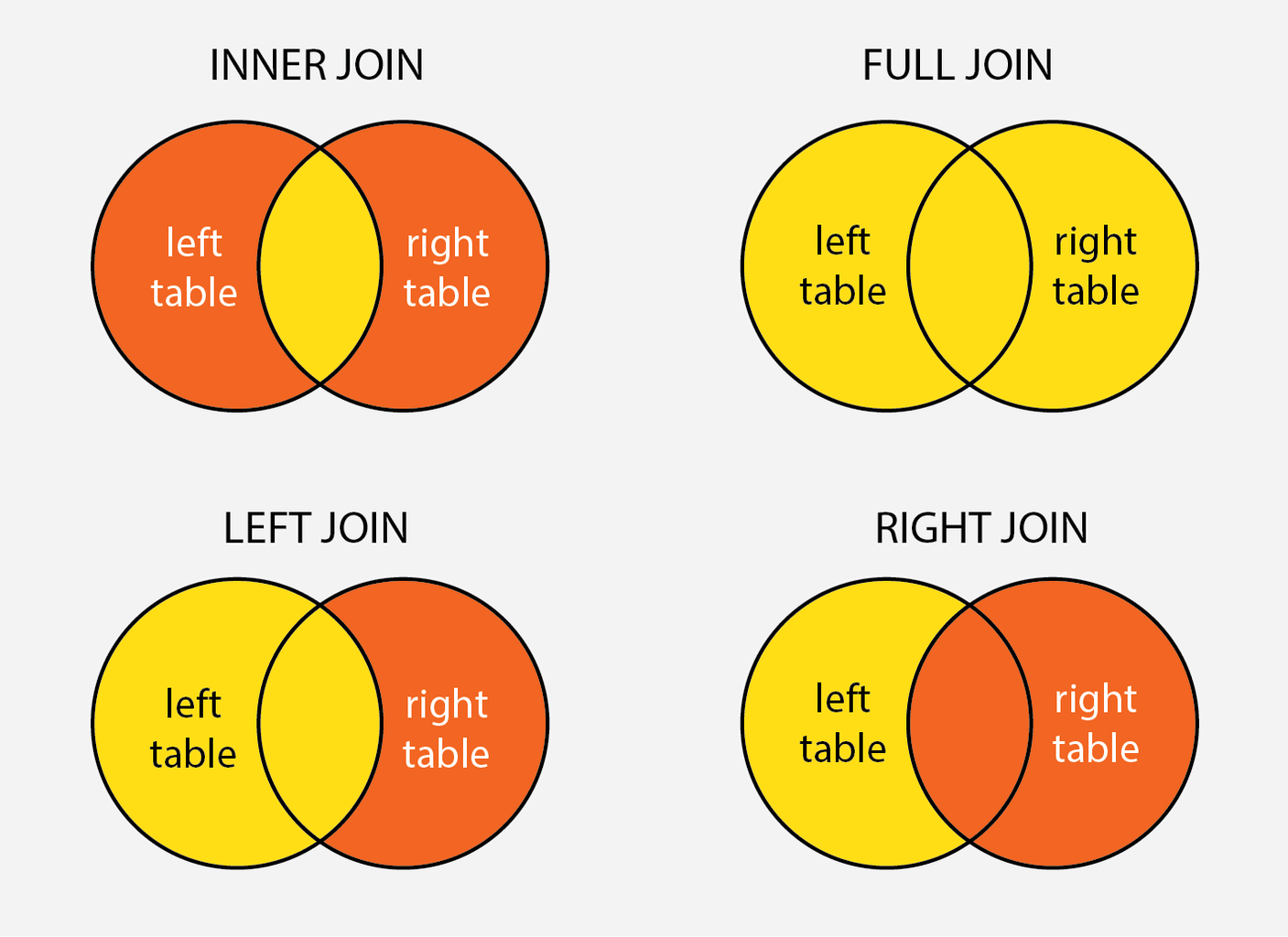
Understanding the nuances between different types of SQL joins is crucial for anyone working with relational databases. Among the various join types, the Left Outer Join Vs Right Outer Join is a common point of confusion. This blog post aims to clarify the differences between these two join types, providing examples and use cases to illustrate their applications.
Understanding SQL Joins
SQL joins are used to combine rows from two or more tables based on a related column between them. The most common types of joins are:
- INNER JOIN
- LEFT OUTER JOIN
- RIGHT OUTER JOIN
- FULL OUTER JOIN
Each type of join serves a specific purpose and returns different sets of results based on the relationship between the tables.
Left Outer Join Vs Right Outer Join: The Basics
Both Left Outer Join and Right Outer Join are used to return all rows from one table and the matched rows from another table. The primary difference lies in which table’s rows are returned in full.
Left Outer Join
A Left Outer Join returns all rows from the left table and the matched rows from the right table. If there is no match, the result is NULL on the side of the right table.
Syntax:
SELECT columns
FROM table1
LEFT OUTER JOIN table2
ON table1.common_field = table2.common_field;
Example:
Consider two tables, Employees and Departments.
| Employees | Departments | ||||||||||||||||||||
|---|---|---|---|---|---|---|---|---|---|---|---|---|---|---|---|---|---|---|---|---|---|
|
|
Using a Left Outer Join on these tables:
SELECT Employees.EmployeeName, Departments.DepartmentName
FROM Employees
LEFT OUTER JOIN Departments
ON Employees.DepartmentID = Departments.DepartmentID;
Result:
| EmployeeName | DepartmentName |
|---|---|
| John Doe | HR |
| Jane Smith | Finance |
| Alice Johnson | NULL |
In this example, Alice Johnson’s department is not listed in the Departments table, so the result shows NULL for the DepartmentName.
Right Outer Join
A Right Outer Join returns all rows from the right table and the matched rows from the left table. If there is no match, the result is NULL on the side of the left table.
Syntax:
SELECT columns
FROM table1
RIGHT OUTER JOIN table2
ON table1.common_field = table2.common_field;
Using the same tables, Employees and Departments, with a Right Outer Join:
SELECT Employees.EmployeeName, Departments.DepartmentName
FROM Employees
RIGHT OUTER JOIN Departments
ON Employees.DepartmentID = Departments.DepartmentID;
Result:
| EmployeeName | DepartmentName |
|---|---|
| John Doe | HR |
| Jane Smith | Finance |
| NULL | IT |
In this case, the IT department is not listed in the Employees table, so the result shows NULL for the EmployeeName.
Left Outer Join Vs Right Outer Join: Key Differences
The primary differences between Left Outer Join and Right Outer Join are:
- Direction of the Join: A Left Outer Join returns all rows from the left table, while a Right Outer Join returns all rows from the right table.
- NULL Values: In a Left Outer Join, NULL values appear in the columns from the right table if there is no match. In a Right Outer Join, NULL values appear in the columns from the left table if there is no match.
- Use Cases: Use a Left Outer Join when you want to ensure all records from the left table are included, regardless of whether they have matching records in the right table. Use a Right Outer Join when you want to ensure all records from the right table are included.
When to Use Left Outer Join Vs Right Outer Join
Choosing between a Left Outer Join and a Right Outer Join depends on the specific requirements of your query. Here are some guidelines:
- Use a Left Outer Join when you need to include all records from the primary table (left table) and want to see related records from the secondary table (right table). This is useful for reporting where you need to include all primary records, even if they have no related data.
- Use a Right Outer Join when you need to include all records from the secondary table (right table) and want to see related records from the primary table (left table). This is less common but can be useful in specific scenarios, such as when you are working with a table that contains all possible values and you want to ensure all those values are included in the result.
In practice, many developers prefer to use Left Outer Joins because they are more intuitive and commonly used. However, understanding both types allows for greater flexibility in query design.
💡 Note: Some databases, like MySQL, do not support the RIGHT OUTER JOIN syntax directly and require using a LEFT OUTER JOIN with table order swapped instead.
Examples and Use Cases
Let’s explore some practical examples to illustrate the use of Left Outer Join and Right Outer Join.
Example 1: Sales Data Analysis
Consider a scenario where you have two tables: Sales and Products. You want to generate a report that includes all products, even those that have not been sold.
| Sales | Products | |||||||||||||||||
|---|---|---|---|---|---|---|---|---|---|---|---|---|---|---|---|---|---|---|
|
|
Using a Left Outer Join:
SELECT Products.ProductName, Sales.Quantity
FROM Products
LEFT OUTER JOIN Sales
ON Products.ProductID = Sales.ProductID;
Result:
| ProductName | Quantity |
|---|---|
| Laptop | 5 |
| Smartphone | 3 |
| Tablet | NULL |
This query ensures that all products are included in the report, even the Tablet, which has not been sold.
Example 2: Employee and Department Data
Consider another scenario where you have two tables: Employees and Departments. You want to generate a report that includes all departments, even those that do not have any employees.
| Employees | Departments | |||||||||||||||||
|---|---|---|---|---|---|---|---|---|---|---|---|---|---|---|---|---|---|---|
|
|
Using a Right Outer Join:
SELECT Employees.EmployeeName, Departments.DepartmentName
FROM Employees
RIGHT OUTER JOIN Departments
ON Employees.DepartmentID = Departments.DepartmentID;
Result:
| EmployeeName | DepartmentName |
|---|---|
| John Doe | HR |
| Jane Smith | Finance |
| NULL | IT |
This query ensures that all departments are included in the report, even the IT department, which does not have any employees.
Understanding the nuances of Left Outer Join Vs Right Outer Join is essential for effective database querying. By knowing when and how to use each type of join, you can ensure that your queries return the desired results and meet the specific requirements of your analysis or reporting needs.
Related Terms:
- difference between left and outer
- left outer join meaning
- left outer join vs full
- left outer join examples
- left outer join visual
- left outer join definition