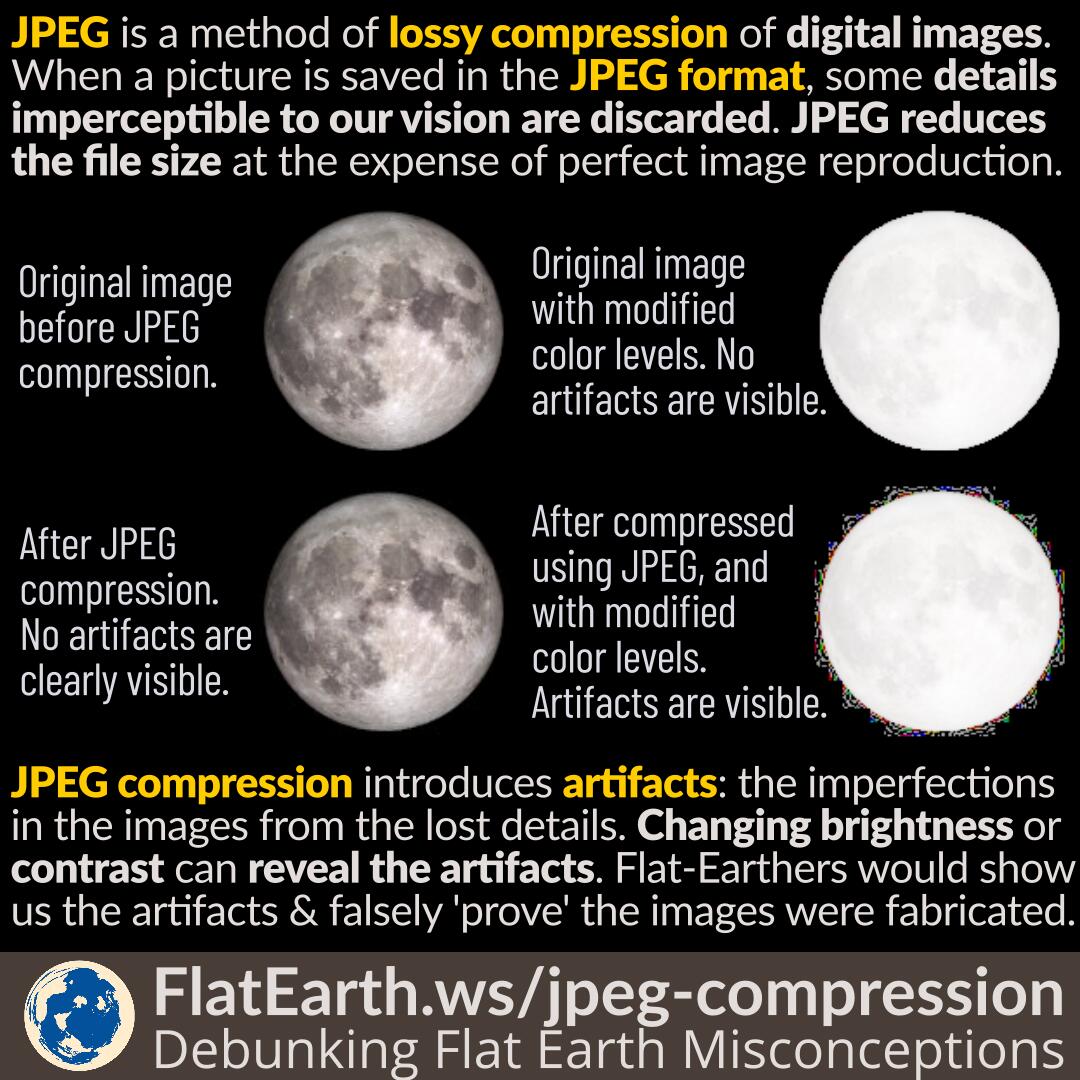
In the digital age, images play a crucial role in communication, entertainment, and information sharing. One of the most common formats for storing and transmitting images is JPEG (Joint Photographic Experts Group). JPEG compression is widely used due to its ability to significantly reduce file sizes while maintaining acceptable image quality. However, this compression process can introduce artifacts, known as Jpeg Compression Artefacts, which can degrade the visual quality of the image. Understanding these artifacts and how to mitigate them is essential for anyone working with digital images.
Understanding JPEG Compression
JPEG compression is a lossy compression technique, meaning that some of the original image data is discarded to achieve smaller file sizes. This process involves several steps, including color space transformation, downsampling, and quantization. The quantization step is where most of the data loss occurs, as it reduces the precision of the image data. This reduction in precision is what leads to the appearance of Jpeg Compression Artefacts.
Types of JPEG Compression Artefacts
There are several types of Jpeg Compression Artefacts that can appear in compressed images. Understanding these artifacts can help in identifying and mitigating their effects.
Blocking Artefacts
Blocking artifacts are one of the most noticeable types of Jpeg Compression Artefacts. They appear as visible grid-like patterns or blocks in the image, especially in areas with smooth gradients or solid colors. This occurs because JPEG compression divides the image into 8x8 pixel blocks and compresses each block independently. When the compression level is high, the boundaries between these blocks become more apparent, resulting in a blocky appearance.
Ringing Artefacts
Ringing artifacts, also known as Gibbs phenomenon, appear as faint, wavy patterns around the edges of objects in the image. These artifacts occur due to the loss of high-frequency components during the compression process. The human eye is particularly sensitive to these patterns, making them more noticeable in high-contrast areas.
Color Banding
Color banding is another common type of Jpeg Compression Artefacts. It manifests as visible bands of color in areas that should have smooth color transitions. This artifact is often seen in gradients and skies, where subtle color changes are compressed into distinct bands. Color banding is more pronounced in images with a limited color depth.
Mosquito Noise
Mosquito noise refers to the appearance of small, high-frequency artifacts around the edges of objects. These artifacts resemble the noise seen in low-quality images and are caused by the loss of fine details during compression. Mosquito noise is particularly noticeable in images with sharp edges and high contrast.
Factors Affecting JPEG Compression Artefacts
Several factors influence the appearance and severity of Jpeg Compression Artefacts. Understanding these factors can help in optimizing the compression process to minimize artifacts.
Compression Level
The level of compression applied to an image directly affects the presence of Jpeg Compression Artefacts. Higher compression levels result in more significant data loss and, consequently, more noticeable artifacts. Conversely, lower compression levels preserve more image data, reducing the visibility of artifacts but resulting in larger file sizes.
Image Content
The content of the image also plays a crucial role in the appearance of Jpeg Compression Artefacts. Images with complex details, high contrast, and sharp edges are more susceptible to artifacts. In contrast, images with smooth gradients and solid colors tend to show fewer artifacts at the same compression level.
Color Depth
The color depth of an image, or the number of bits used to represent each color channel, affects the visibility of Jpeg Compression Artefacts. Images with higher color depth (e.g., 24-bit or 32-bit) generally show fewer artifacts than those with lower color depth (e.g., 8-bit). This is because higher color depth provides more information for the compression algorithm to work with, resulting in better preservation of image details.
Mitigating JPEG Compression Artefacts
While Jpeg Compression Artefacts are an inherent part of the JPEG compression process, there are several strategies to mitigate their effects and improve image quality.
Optimizing Compression Settings
Adjusting the compression settings can help reduce the visibility of Jpeg Compression Artefacts. Using a lower compression level or a higher quality setting can preserve more image data, resulting in fewer artifacts. However, this approach may increase the file size. Finding the right balance between compression level and image quality is essential for optimizing the compression process.
Using Progressive JPEG
Progressive JPEG is a variant of the standard JPEG format that allows images to be displayed in multiple passes, with increasing levels of detail. This approach can help reduce the visibility of Jpeg Compression Artefacts by gradually revealing the image, making the artifacts less noticeable. Progressive JPEG is particularly useful for web images, where faster loading times and better visual quality are desired.
Post-Processing Techniques
Several post-processing techniques can be used to reduce the visibility of Jpeg Compression Artefacts. These techniques involve applying filters and algorithms to the compressed image to smooth out artifacts and enhance image quality. Some common post-processing techniques include:
- Deblocking Filters: These filters are designed to reduce the visibility of blocking artifacts by smoothing the boundaries between 8x8 pixel blocks.
- Denoising Algorithms: These algorithms can help reduce mosquito noise and other high-frequency artifacts by removing unwanted noise from the image.
- Color Correction: Adjusting the color balance and contrast of the image can help mitigate color banding and other color-related artifacts.
Alternative Image Formats
In some cases, using alternative image formats can help avoid Jpeg Compression Artefacts altogether. Formats like PNG (Portable Network Graphics) and WebP offer lossless compression, preserving all image data without introducing artifacts. However, these formats may result in larger file sizes compared to JPEG. Choosing the right format depends on the specific requirements of the application and the desired balance between image quality and file size.
💡 Note: While alternative formats can avoid Jpeg Compression Artefacts, they may not be suitable for all applications due to larger file sizes and different compression characteristics.
Comparing JPEG Compression Artefacts in Different Scenarios
To better understand the impact of Jpeg Compression Artefacts, let’s compare how they manifest in different scenarios. The following table illustrates the visibility of artifacts in various image types and compression levels.
| Image Type | Low Compression | Medium Compression | High Compression |
|---|---|---|---|
| Photographic Image | Minimal artifacts | Slight blocking and ringing | Noticeable blocking, ringing, and color banding |
| Graphic Image | Minimal artifacts | Slight blocking and mosquito noise | Noticeable blocking, mosquito noise, and color banding |
| Text Image | Minimal artifacts | Slight blocking and ringing | Noticeable blocking, ringing, and color banding |
As shown in the table, the visibility of Jpeg Compression Artefacts increases with higher compression levels and varies depending on the type of image. Photographic images tend to show more noticeable artifacts at higher compression levels, while graphic and text images may exhibit different types of artifacts.
In the digital age, images play a crucial role in communication, entertainment, and information sharing. One of the most common formats for storing and transmitting images is JPEG (Joint Photographic Experts Group). JPEG compression is widely used due to its ability to significantly reduce file sizes while maintaining acceptable image quality. However, this compression process can introduce artifacts, known as Jpeg Compression Artefacts, which can degrade the visual quality of the image. Understanding these artifacts and how to mitigate them is essential for anyone working with digital images.
In conclusion, Jpeg Compression Artefacts are an inherent part of the JPEG compression process, but understanding their types, causes, and mitigation strategies can help improve image quality. By optimizing compression settings, using progressive JPEG, applying post-processing techniques, and considering alternative image formats, it is possible to reduce the visibility of artifacts and enhance the overall visual quality of compressed images. Whether you are a photographer, graphic designer, or web developer, being aware of Jpeg Compression Artefacts and how to manage them can significantly impact the quality of your digital images.
Related Terms:
- compression artifacts meaning
- artifacts in image processing
- image artefact
- image compression detection
- jpeg artifacts
- image compression effects