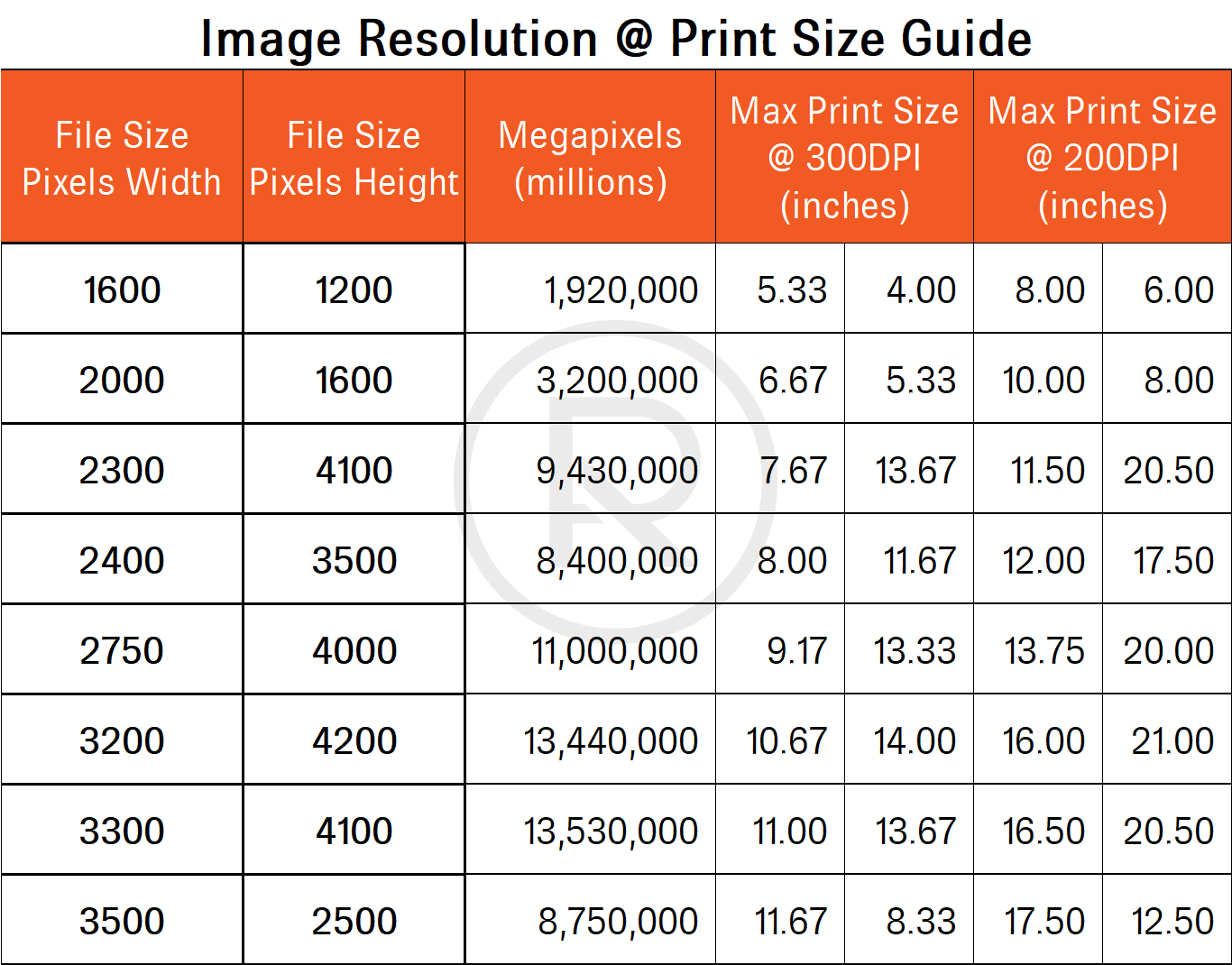
Understanding the difference between DPI (Dots Per Inch) and PPI (Pixels Per Inch) is crucial for anyone involved in digital imaging, printing, or graphic design. These terms are often used interchangeably, but they have distinct meanings and applications. This post will delve into the definitions of DPI and PPI, their significance in various contexts, and how to determine the appropriate settings for your projects.
What is DPI?
DPI, or Dots Per Inch, refers to the number of dots that a printer can produce in a linear inch. It is a measure of the printer’s resolution and determines the quality of the printed output. A higher DPI means more dots per inch, resulting in sharper and more detailed prints. DPI is particularly important in printing because it directly affects the clarity and crispness of the printed image.
What is PPI?
PPI, or Pixels Per Inch, refers to the number of pixels in a linear inch on a digital display or image. It is a measure of the resolution of digital images and screens. A higher PPI means more pixels per inch, resulting in a clearer and more detailed image on digital displays. PPI is crucial for digital imaging and screen resolution, as it determines how sharp and detailed an image appears on a screen.
DPI vs. PPI: Key Differences
While DPI and PPI are related concepts, they serve different purposes and are used in different contexts. Here are the key differences between the two:
- Definition: DPI measures the number of dots a printer can produce per inch, while PPI measures the number of pixels per inch on a digital display or image.
- Application: DPI is used in printing to determine the quality of printed output, while PPI is used in digital imaging and screen resolution to determine the clarity of images on screens.
- Context: DPI is relevant for printers and printed materials, while PPI is relevant for digital displays, cameras, and digital images.
Importance of DPI in Printing
When it comes to printing, DPI is a critical factor that determines the quality of the printed output. Here are some key points to consider:
- Print Quality: A higher DPI results in sharper and more detailed prints. For professional printing, a DPI of 300 or higher is often recommended.
- File Size: Higher DPI settings result in larger file sizes, which can be a consideration for storage and transmission.
- Viewing Distance: The optimal DPI can vary depending on the viewing distance. For example, a poster viewed from a distance may not require as high a DPI as a photograph viewed up close.
Importance of PPI in Digital Imaging
In digital imaging, PPI is essential for ensuring that images appear sharp and clear on screens. Here are some key points to consider:
- Screen Resolution: Higher PPI results in sharper and more detailed images on screens. Modern high-resolution displays often have PPI values of 300 or higher.
- Image Quality: The PPI of an image affects its quality when viewed on different devices. For example, an image with a low PPI may appear pixelated on a high-resolution screen.
- File Size: Higher PPI settings result in larger file sizes, which can be a consideration for storage and transmission.
Determining the Right DPI or PPI Settings
Choosing the right DPI or PPI settings depends on the specific requirements of your project. Here are some guidelines to help you determine the appropriate settings:
- Printing: For high-quality prints, aim for a DPI of 300 or higher. For large-format prints viewed from a distance, a lower DPI may be sufficient.
- Digital Displays: For high-resolution screens, aim for a PPI of 300 or higher. For standard screens, a PPI of 96 or 120 may be sufficient.
- Web Images: For web images, a PPI of 72 is generally sufficient, as most screens have a resolution of 96 PPI or higher.
Common DPI and PPI Values
Here is a table of common DPI and PPI values and their typical uses:
| DPI/PPI Value | Typical Use |
|---|---|
| 72 | Web images, standard screen resolution |
| 96 | Standard screen resolution |
| 120 | High-resolution screens |
| 300 | High-quality printing, professional photography |
| 600 | High-quality printing, professional photography |
📝 Note: The optimal DPI or PPI settings can vary depending on the specific requirements of your project and the viewing conditions. Always consider the intended use and viewing distance when choosing the appropriate settings.
Conclusion
Understanding the difference between DPI and PPI is essential for anyone working with digital images, printing, or graphic design. DPI is crucial for printing, determining the quality of printed output, while PPI is important for digital imaging, affecting the clarity and detail of images on screens. By choosing the right DPI or PPI settings, you can ensure that your projects meet the desired quality standards and viewing requirements. Whether you are printing high-quality photographs or designing digital images for screens, knowing the difference between DPI and PPI will help you achieve the best results.
Related Terms:
- dots per inch dpi
- is dpi same as ppi
- dpi meaning printer
- what is dpi in printing
- pixels vs dpi resolution
- what is dpi in pixels