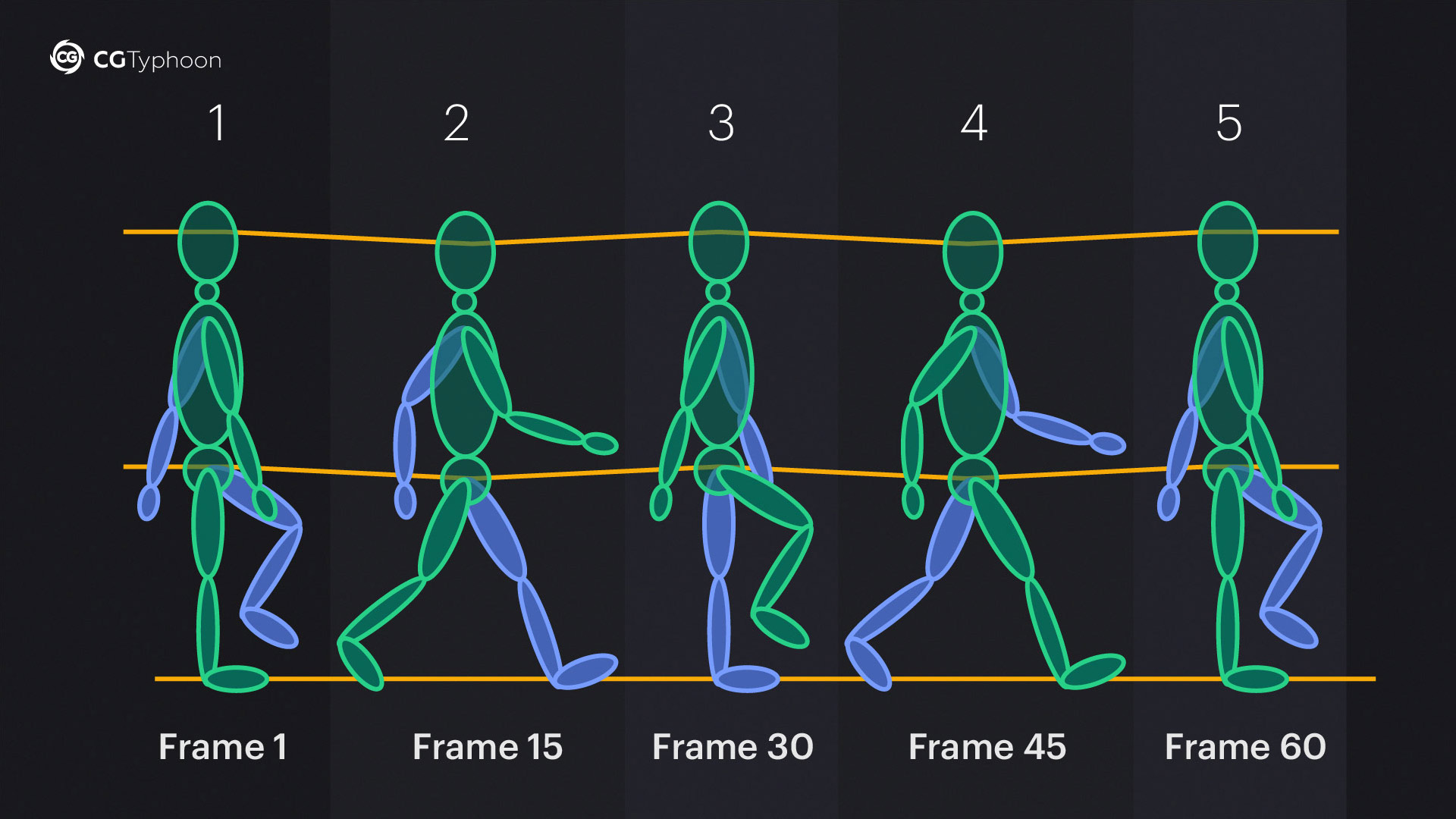
Creating a compelling animation walk sequence is a fundamental skill for any animator. Whether you're working on a feature film, a video game, or a short animation project, mastering the art of walking can bring your characters to life and make them more relatable to the audience. This guide will walk you through the essential steps and techniques to create a realistic and engaging animation walk sequence.
Understanding the Basics of Walking
Before diving into the technical aspects, it's crucial to understand the basic mechanics of human walking. Walking is a cyclical motion that involves a series of coordinated movements. The key phases of a walk cycle are:
- Heel Strike: The moment when the heel of the foot touches the ground.
- Flat Foot: The foot is fully planted on the ground.
- Heel Off: The heel lifts off the ground as the foot begins to roll forward.
- Toe Off: The toes push off the ground to propel the body forward.
- Swing Phase: The leg swings forward to prepare for the next heel strike.
Understanding these phases will help you create a more natural and believable animation walk sequence.
Setting Up Your Scene
To begin your animation walk sequence, you need to set up your scene properly. This includes:
- Character Rig: Ensure your character is properly rigged with a skeleton that allows for natural movement.
- Camera Angle: Choose a camera angle that best showcases the walk. A side view is often the most effective for studying the walk cycle.
- Ground Plane: Add a ground plane to help visualize the foot placement and ensure the character stays grounded.
Once your scene is set up, you can start animating the walk cycle.
Creating the Walk Cycle
The walk cycle is the foundation of any animation walk sequence. It consists of 24 frames, which can be divided into two main parts: the contact phase and the swing phase. Here’s a step-by-step guide to creating a basic walk cycle:
Contact Phase
The contact phase involves the foot making contact with the ground. This phase can be further divided into:
- Heel Strike (Frame 1): The heel of the foot touches the ground.
- Flat Foot (Frame 3-4): The entire foot is flat on the ground.
- Heel Off (Frame 5-6): The heel lifts off the ground as the foot begins to roll forward.
- Toe Off (Frame 7-8): The toes push off the ground to propel the body forward.
Swing Phase
The swing phase involves the leg swinging forward to prepare for the next heel strike. This phase can be further divided into:
- Leg Swing (Frame 9-12): The leg swings forward and upward.
- Leg Extension (Frame 13-16): The leg extends downward to prepare for the next heel strike.
- Heel Strike (Frame 17): The heel of the foot touches the ground, completing the cycle.
Repeat these steps for the other leg to complete the walk cycle. The key is to ensure that the movements are smooth and fluid, with a natural flow between the contact and swing phases.
Adding Secondary Motion
To make your animation walk sequence more dynamic, you can add secondary motion. Secondary motion refers to the subtle movements that occur as a result of the primary action. For a walk cycle, this can include:
- Arm Swing: The arms swing in opposition to the legs to maintain balance.
- Head Bob: The head bobs slightly up and down with each step.
- Hip Rotation: The hips rotate slightly to add a natural sway to the walk.
These secondary motions help to create a more lifelike and engaging animation walk sequence.
Refining the Walk Cycle
Once you have the basic walk cycle and secondary motions in place, it's time to refine your animation walk sequence. This involves:
- Timing: Adjust the timing of the keyframes to ensure the walk cycle feels natural and not rushed.
- Spacing: Ensure the spacing between keyframes is consistent to maintain a smooth flow.
- Overlapping Action: Add overlapping action to the limbs and body parts to create a more dynamic and realistic walk.
Refining these elements will help you achieve a more polished and believable animation walk sequence.
💡 Note: Pay close attention to the details, such as the slight bend in the knees and the natural sway of the hips, to make the walk cycle more convincing.
Common Mistakes to Avoid
Creating a realistic animation walk sequence can be challenging, and there are several common mistakes to avoid:
- Rigid Movement: Avoid making the character's movements too rigid. Ensure there is a natural flow and flexibility in the walk.
- Inconsistent Timing: Inconsistent timing can make the walk cycle feel unnatural. Ensure the timing is consistent throughout the cycle.
- Lack of Secondary Motion: Without secondary motion, the walk cycle can feel flat and lifeless. Add subtle movements to enhance realism.
By avoiding these mistakes, you can create a more convincing and engaging animation walk sequence.
Advanced Techniques for Enhancing Realism
For those looking to take their animation walk sequence to the next level, consider these advanced techniques:
Dynamic Weight Shift
Dynamic weight shift involves transferring the character's weight from one foot to the other as they walk. This can be achieved by:
- Adjusting the Center of Gravity: Shift the center of gravity to the supporting foot during the contact phase.
- Adding Squash and Stretch: Use squash and stretch to emphasize the weight shift and add dynamic movement.
Foot Sliding
Foot sliding can add a sense of realism to the walk cycle. This involves:
- Sliding the Foot: Allow the foot to slide slightly as it makes contact with the ground.
- Adjusting the Timing: Adjust the timing of the foot slide to ensure it feels natural and not forced.
Environmental Interaction
Interacting with the environment can make the walk cycle more engaging. This can include:
- Ground Reaction: Add ground reaction forces to the character's feet as they make contact with the ground.
- Obstacle Interaction: Have the character interact with obstacles in the environment, such as stepping over rocks or avoiding puddles.
These advanced techniques can help you create a more dynamic and realistic animation walk sequence.
💡 Note: Experiment with different techniques and styles to find what works best for your character and the story you're telling.
Final Touches and Polishing
Once you have refined your animation walk sequence, it's time to add the final touches and polish it to perfection. This involves:
- Cleaning Up Keyframes: Remove any unnecessary keyframes and ensure the animation is smooth and fluid.
- Adding Final Details: Add any final details, such as subtle facial expressions or clothing movement, to enhance realism.
- Reviewing the Animation: Review the animation multiple times to ensure it meets your standards and makes the necessary adjustments.
By adding these final touches, you can create a polished and professional animation walk sequence that brings your character to life.
Creating a compelling animation walk sequence requires a combination of technical skill and artistic vision. By understanding the basics of walking, setting up your scene properly, and refining your animation, you can create a walk cycle that is both realistic and engaging. Whether you’re a beginner or an experienced animator, mastering the art of walking is an essential skill that will enhance your animation projects and bring your characters to life.
Related Terms:
- walk cycle animation poses
- how to animate someone walking
- walking animation for beginners
- walk cycle animator's survival kit
- how to make walking animations
- 2d character walking animation